tutorial
Reverse Proxy Setup: Choose Between Nginx, Caddy, and Traefik
Almost every guide on this blog eventually says "put a reverse proxy in front of it." Vaultwarden needs one. S...

Clicking through a panel to provision a VPS, trigger a reboot, or change a reverse DNS record is fine when you do it once a month. When you do it ten times a day because your CI pipeline needs a fresh server for each test run, or because your game server fleet needs to scale with weekend traffic, the panel becomes the bottleneck.
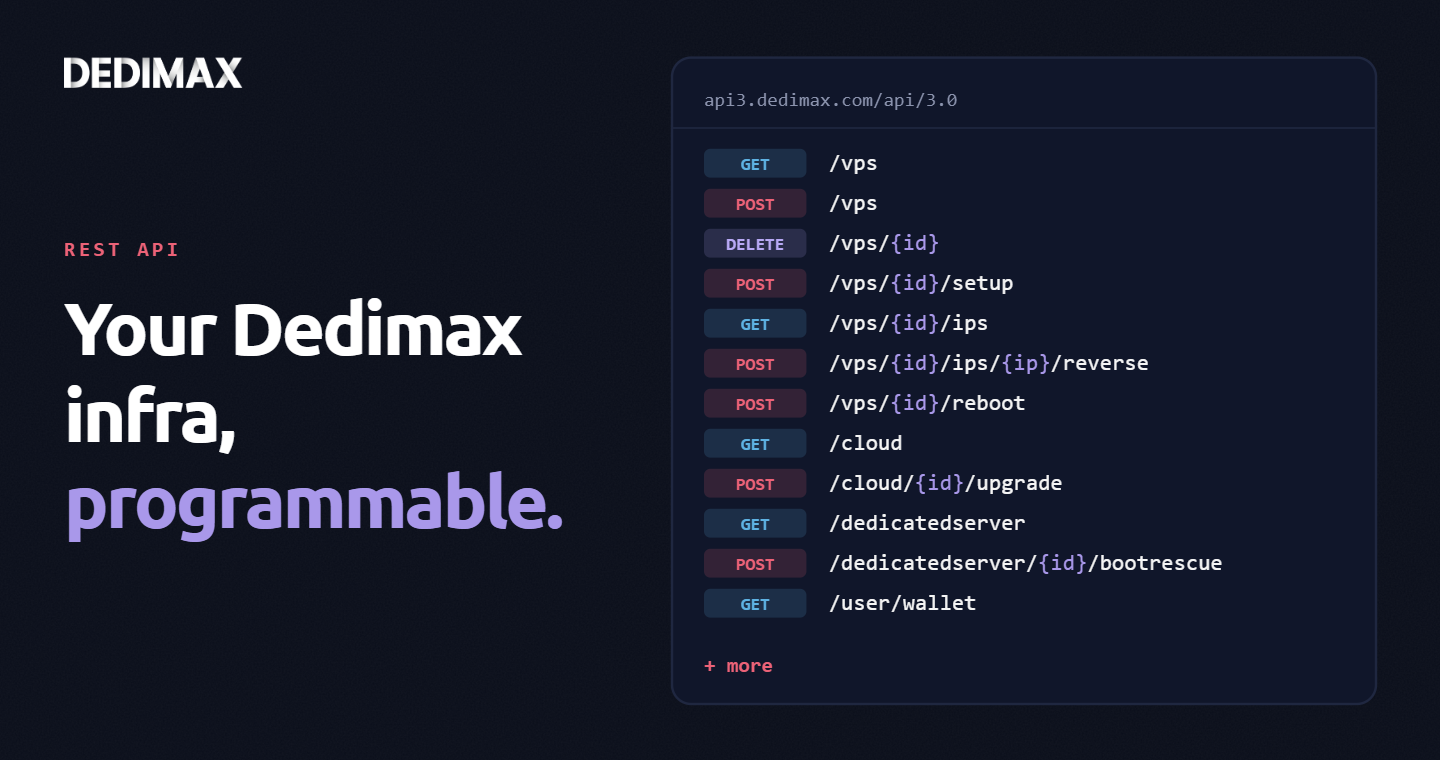
The Dedimax API v3.0.2 exposes everything the panel does, as HTTP endpoints you can call from any language. 61 operations across Cloud, VPS, Dedicated Server, and User resources. Provision, destroy, reboot, reinstall, rename, manage IPs, configure reverse DNS, boot into rescue mode, upgrade plans. If you can do it from the panel, you can automate it.
This article walks through five concrete use cases that developers actually need, with working code examples against the real API. If you've been using the panel for everything, these are the moments where moving to the API saves you hours per week.
Base URL: https://api3.dedimax.com/api/3.0/
Authentication: BasicAuth with your API credentials. Generate your API_ID and API_KEY from your Dedimax panel. Pass them with every request:
curl -u "YOUR_API_ID:YOUR_API_KEY" \
https://api3.dedimax.com/api/3.0/userFormat: JSON responses throughout. Standard HTTP status codes. Rate limiting applies, respect Retry-After headers when you get a 429.
Documentation: the full OpenAPI spec and interactive explorer live at https://api3.dedimax.com/api/documentation. Use the examples below as a starting point, consult the spec for every parameter and schema detail.
With those out of the way, here are the five patterns that make the API worth integrating.
The classic developer need: your CI needs a clean Linux environment for each run of your integration tests. Spinning up a VPS, running the tests, destroying the VPS. Costs a few cents per run, scales infinitely, zero flaky-infra incidents from leftover state.
The flow:
#!/bin/bash
set -euo pipefail

API="https://api3.dedimax.com/api/3.0"
AUTH="-u ${DEDIMAX_API_ID}:${DEDIMAX_API_KEY}"

# Create a VPS: plan ID 1, Paris location ID 4, Ubuntu template ID 42
VPS_ID=$(curl -sS $AUTH -X POST \
    "$API/vps?plan=1&location=4&os=42" \
    | jq -r '.id')

echo "Created VPS $VPS_ID, waiting for IP..."

# Poll until the IP is assigned
for i in {1..30}; do
    IP=$(curl -sS $AUTH "$API/vps/$VPS_ID" | jq -r '.IP // empty')
    [ -n "$IP" ] && break
    sleep 10
done

echo "VPS ready at $IP"

# Run your tests
./run-integration-tests.sh "$IP"

# Clean up
curl -sS $AUTH -X DELETE "$API/vps/$VPS_ID"
echo "VPS $VPS_ID destroyed"
Call GET /vps/plan and GET /vps/location once to discover the IDs that correspond to your preferred specs and datacenter, cache them in your CI config. The whole script runs in your pipeline between the "setup" and "teardown" stages.
Variant of the above for when you have a dedicated test server that needs to be returned to a known clean state between test suites. Instead of destroying and recreating, reinstall the OS from a template.
#!/bin/bash
API="https://api3.dedimax.com/api/3.0"
AUTH="-u ${DEDIMAX_API_ID}:${DEDIMAX_API_KEY}"

VPS_ID=12345  # your dedicated test VPS
TEMPLATE_ID=42  # Ubuntu LTS template

# Trigger a fresh OS install
curl -sS $AUTH -X POST "$API/vps/$VPS_ID/setup?template=$TEMPLATE_ID"

# Wait for it to come back online
sleep 60
curl -sS $AUTH -X GET "$API/vps/$VPS_ID/reboot"
Faster than full provisioning because the hardware stays the same, you only re-install the OS. Useful for integration tests that need a persistent IP (e.g., for stable DNS records pointing to your test environment) but a fresh system state.
List available templates with GET /vps/templates to discover which OS versions you can target.
If you've read our email deliverability guide, you know reverse DNS (PTR) is the single most-missed check in self-hosted mail setups. If you run multiple mail-sending servers, setting reverse DNS manually from the panel becomes error-prone fast.
Automate it: when you provision a new mail server, set its PTR record automatically to match its intended hostname.
python
import requests
from requests.auth import HTTPBasicAuth
import os

API = "https://api3.dedimax.com/api/3.0"
auth = HTTPBasicAuth(os.environ["DEDIMAX_API_ID"],
                     os.environ["DEDIMAX_API_KEY"])

def set_reverse_dns(vps_id: int, hostname: str):
    """Set PTR record for every IP on a VPS to match hostname."""
    # Get all IPs on this VPS
    ips = requests.get(f"{API}/vps/{vps_id}/ips", auth=auth).json()

    for ip_info in ips:
        ip = ip_info["ip"]
        resp = requests.post(
            f"{API}/vps/{vps_id}/ips/{ip}/reverse",
            params={"reverse": hostname},
            auth=auth
        )
        resp.raise_for_status()
        print(f"PTR for {ip} set to {hostname}")

# Example: after provisioning mail-prod-02
set_reverse_dns(vps_id=12345, hostname="mail-prod-02.yourdomain.com")
Combine this with Use case 1 to get a mail server that's deliverability-ready from the moment it's provisioned: VPS created, hostname set, A record published via your DNS provider's API, PTR set via Dedimax API, all without touching a panel.
The same endpoint works on Cloud (/cloud/{id}/ips/{ip}/reverse) and Dedicated (/dedicatedserver/{id}/ip/reverse), so your mail fleet can span tiers without changing the automation.
The panel gives you per-server detail. What it doesn't give you is a cross-fleet view that your ops team or your CFO can glance at. With four API calls, you can build exactly the dashboard you need.
python
import requests
from requests.auth import HTTPBasicAuth
from datetime import datetime
import os

API = "https://api3.dedimax.com/api/3.0"
auth = HTTPBasicAuth(os.environ["DEDIMAX_API_ID"],
                     os.environ["DEDIMAX_API_KEY"])

def fetch_fleet_overview():
    """Fetch all servers across tiers plus wallet state."""
    vps = requests.get(f"{API}/vps", auth=auth).json()
    cloud = requests.get(f"{API}/cloud", auth=auth).json()
    dedicated = requests.get(f"{API}/dedicatedserver", auth=auth).json()
    wallet = requests.get(f"{API}/user/wallet", auth=auth).json()
    notifications = requests.get(f"{API}/user/notifications",
                                  auth=auth).json()

    return {
        "fleet": {
            "vps_count": len(vps),
            "cloud_count": len(cloud),
            "dedicated_count": len(dedicated),
            "total": len(vps) + len(cloud) + len(dedicated),
        },
        "servers_by_region": _group_by_region(vps + cloud),
        "expiring_soon": _find_expiring(vps + cloud + dedicated),
        "wallet": wallet,
        "unread_notifications": len(notifications),
    }

def _find_expiring(servers, days=14):
    """Return servers whose billing period ends in the next N days."""
    now = datetime.utcnow()
    expiring = []
    for s in servers:
        if "end" in s:
            end = datetime.fromisoformat(s["end"])
            delta_days = (end - now).days
            if 0 <= delta_days <= days:
                expiring.append({
                    "id": s["id"],
                    "label": s.get("label", s.get("hostname", "unlabeled")),
                    "days_remaining": delta_days,
                })
    return expiring

if __name__ == "__main__":
    overview = fetch_fleet_overview()
    print(f"Total servers: {overview['fleet']['total']}")
    print(f"Wallet: {overview['wallet']}")
    if overview['expiring_soon']:
        print("\nExpiring soon:")
        for s in overview['expiring_soon']:
            print(f"  - {s['label']} (ID {s['id']}): "
                  f"{s['days_remaining']} days remaining")
Pipe this into a Grafana dashboard, a Slack daily digest, or a simple HTML page. The point is: your infra visibility matches how your team actually operates, not how the panel is organized.
For teams running game communities (FiveM, Minecraft, Valheim), traffic is bursty. Weeknight evenings and weekends need capacity your Tuesday morning doesn't. Manually spinning up and tearing down 5-10 servers per week burns time; automating it makes the fleet elastic.
python
import requests
from requests.auth import HTTPBasicAuth
import os

API = "https://api3.dedimax.com/api/3.0"
auth = HTTPBasicAuth(os.environ["DEDIMAX_API_ID"],
                     os.environ["DEDIMAX_API_KEY"])

GAMING_PLAN = 7       # VPS plan with 8GB RAM, 4 vCPU
GAMING_LOCATION = 4   # Closest datacenter to your community
GAMING_TEMPLATE = 42  # Ubuntu with your pre-configured image

def spawn_game_servers(count: int, label_prefix: str):
    """Spawn N game servers tagged with a consistent label."""
    spawned = []
    for i in range(count):
        label = f"{label_prefix}-{i+1:02d}"

        # Create the VPS
        resp = requests.post(
            f"{API}/vps",
            params={"plan": GAMING_PLAN,
                    "location": GAMING_LOCATION,
                    "os": GAMING_TEMPLATE},
            auth=auth
        )
        vps = resp.json()
        vps_id = vps["id"]

        # Tag it so we can find it later
        requests.post(f"{API}/vps/{vps_id}/label",
                      params={"label": label}, auth=auth)

        spawned.append({"id": vps_id, "label": label})
        print(f"Spawned {label} (ID {vps_id})")

    return spawned

def teardown_servers_by_label(label_prefix: str):
    """Destroy all servers matching a label prefix."""
    all_vps = requests.get(f"{API}/vps", auth=auth).json()
    to_destroy = [v for v in all_vps
                  if v.get("label", "").startswith(label_prefix)]

    for v in to_destroy:
        requests.delete(f"{API}/vps/{v['id']}", auth=auth)
        print(f"Destroyed {v.get('label')} (ID {v['id']})")

# Friday evening: spawn weekend capacity
spawn_game_servers(count=5, label_prefix="weekend-fivem")

# Monday morning: tear it down
teardown_servers_by_label("weekend-fivem")
Trigger these on a schedule (cron, systemd timer, GitHub Actions scheduled workflow, whatever fits your stack). Combine with Discord webhooks to alert your community when new servers come online. The whole fleet becomes code: version-controlled, reviewable, repeatable.
The use cases above touch maybe a dozen of the available endpoints. Here's the full breakdown of what the API covers:
VPS (15 endpoints): list/create/get/delete, locations, plans, addons, templates, label, reboot, shutdown, IPs management, reverse DNS, OS reinstall.
Cloud (19 endpoints): everything VPS has, plus plan upgrade, clone (snapshot-and-restore pattern), setup from template.
Dedicated Server (24 endpoints): list/create/get/delete, plans with per-plan addons and OS options, label, reboot, shutdown, hostname, IP management, reverse DNS, OS reinstall, addon management, rescue mode (list templates, boot into rescue, get rescue credentials, boot normal), IPMI management (view, add public IP, remove).
User (3 endpoints): profile, wallet balance, notifications.
If you've been managing infrastructure through the panel because "the API probably doesn't do X", there's a good chance it does.
Start small: pick the use case closest to a pain point you have today. Provisioning for CI is the easiest win if you have any kind of integration test suite. Reverse DNS automation is the easiest win if you run mail. Dashboard aggregation is the easiest win if you have more than 5 servers to track.
Keep credentials safe: your API_ID and API_KEY give full control over your fleet, including destroying servers. Treat them like production SSH keys: environment variables, secrets managers, never committed to git, rotated periodically. Our post-provisioning checklist covers the broader credentials hygiene story.
Build gradually: start with read-only scripts (fleet overview, expiring servers alert) to get comfortable with the API shape. Move to write operations (provisioning, reverse DNS) once you trust your idempotency and your error handling. The destructive operations (DELETE, OS reinstall) deserve a confirmation prompt or a dry-run mode in whatever tooling you build around them.
The full OpenAPI specification, interactive explorer, and parameter details live at https://api3.dedimax.com/api/documentation. If an endpoint you need isn't exposed yet, let support know, the API gets extended regularly based on what customers automate against it.
For teams managing more than a handful of VPS or dedicated servers, the API is where "we have Dedimax servers" turns into "our infrastructure is part of our codebase". That shift pays back the time investment within weeks.
Deploy your own VPS
300+ apps in one click, full root access, ready in minutes.
From €9.99/mo
Almost every guide on this blog eventually says "put a reverse proxy in front of it." Vaultwarden needs one. S...
Every sysadmin has read the "change the SSH port to 2222" advice. It's the wrong lesson. Attackers scanning th...
Your passwords are the keys to everything you own online. Bank accounts, email, cloud storage, work systems, p...
Take control of your dedicated server (settings, data ...) without any limits in apps usage.
What are you waiting for ?
We’re waiting for you on our blog. New guides and tutorials published regularly (sysadmin, gaming, devops...) !
Let me check