tutorial
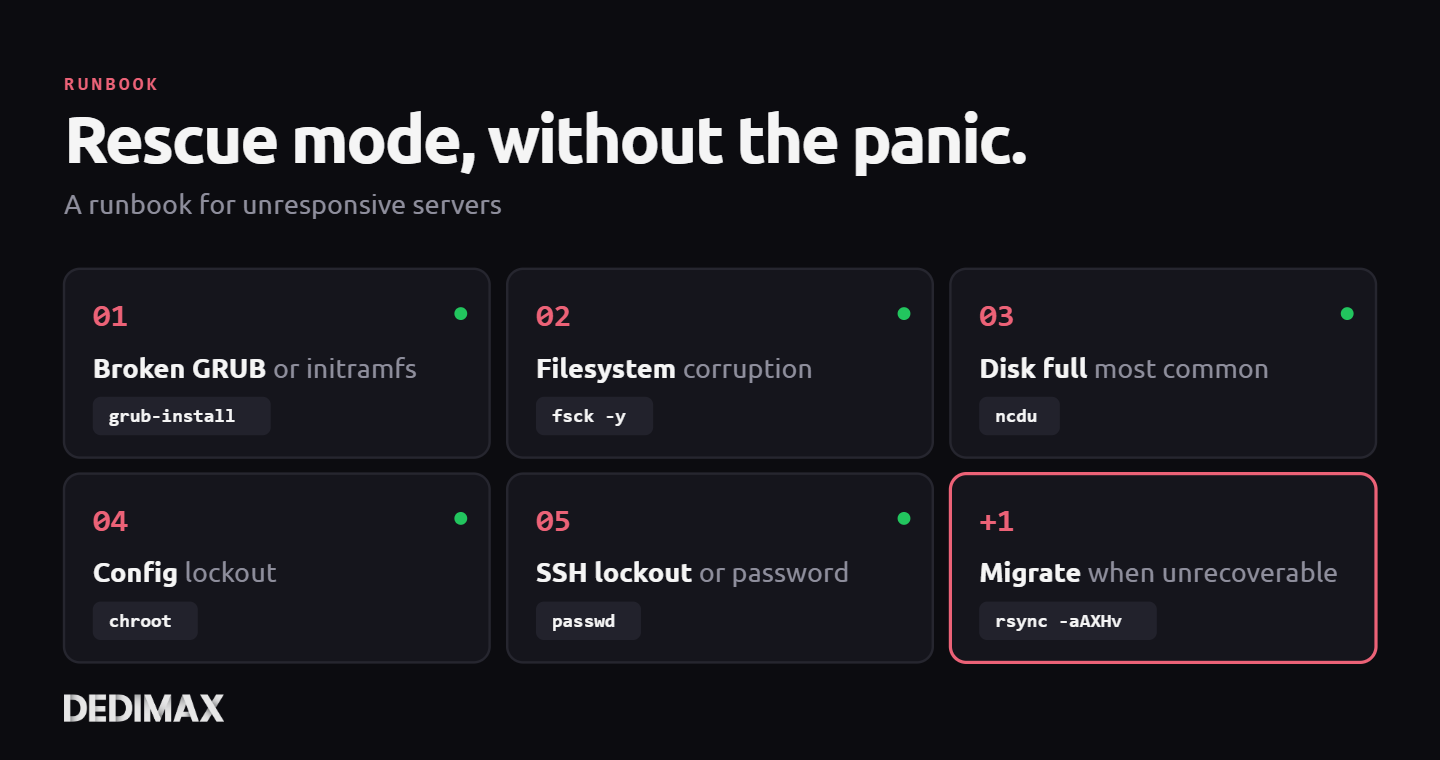
Rescue Mode Without the Panic: A Runbook for Unresponsive Servers
The call comes in at the worst time. Your server isn't responding. SSH hangs. The application is down. Monitor...


Every few months, someone on r/sysadmin or Hacker News restarts the systemd timers vs cron debate. The comments fill with the usual arguments: timers have better logging, cron has 40 years of docs, timers integrate with systemd dependencies, cron is universal, timers have calendar expressions, cron fits on one line. Everyone comes out of it more convinced of whatever they walked in with.
The feature comparisons are not useless. They are just not the question that matters.
The question that matters is: at 3 AM, when the scheduled job didn't run and the alerts are firing, who's debugging it, and what do they know?
Answer that first. Pick the tool accordingly. The feature list is secondary.
This article lays out what cron, systemd timers, and the modern orchestrator-based alternatives actually offer, then walks through the single question that should drive your choice for each environment. One worked migration example at the end, for the most common case teams actually ask about.
Any serious discussion of scheduled jobs on Linux today really involves four tools, not two. Treating it as a cron-vs-timers binary misses the point in most real stacks.
cron is the 1975 Unix scheduler. A daemon (cron, crond, vixie-cron, systemd-cron depending on your distro) reads files in /etc/cron.d/, /etc/crontab, and per-user crontab -e files. It runs commands at specified times. Logs go to syslog by default, or wherever your service happens to redirect output. If the server was off when a job should have run, cron doesn't catch up. Simple, universal, and quietly running on nearly every Linux server.
anacron is the "my laptop isn't on at 3 AM" extension to cron. It tracks the last-run timestamp of each job and runs it on next boot if the window was missed. Mostly useful on desktops, laptops, and intermittently-powered servers. Rarely the right tool for server workloads where uptime is assumed.
systemd timers are systemd units that trigger other systemd units on a schedule. Two files per job: a .timer that says "when", and a .service that says "what". Jobs inherit systemd's journal logging, dependency ordering, resource controls (CPUQuota, MemoryMax), and restart policies. They can be persistent (catch up missed runs) or not. They can trigger relative to system events (boot, previous run) rather than wall clock time. Shipped with every modern Linux distribution.
Modern orchestrator schedulers (Kubernetes CronJob, Nomad periodic jobs, Rundeck schedules) run scheduled jobs across a cluster of hosts, with built-in retry policies, history, UI-driven management, and integration with your broader workload orchestration. They solve "where does this job run" and "what if that host is down" in ways cron and timers cannot.
Ignoring the orchestrator tier, and especially pretending Kubernetes CronJob is "overkill" if your stack already runs Kubernetes, is the kind of mistake that comes from treating this as a binary choice.
Set the feature comparisons aside and look at what each tool was built to solve.
cron optimizes for universality and minimal cognitive load for the simple case. One line in a crontab, the job runs. Every sysadmin from 1985 onwards knows how to read it. The failure mode for simple jobs (nightly backup, weekly cleanup, hourly health ping) is well understood: if the output disappeared, check mail or syslog.
systemd timers optimize for integration with the rest of systemd. If your service already has a .service unit with resource limits, environment config, dependency ordering, and journal logging, a .timer just adds "when to trigger it" on top. You get all the systemd operational surface automatically: systemctl status, journalctl -u, systemctl list-timers, cgroup accounting.
Kubernetes CronJob and Nomad periodic jobs optimize for running scheduled work in the same operational model as the rest of your cluster. If your application already runs in Kubernetes with proper logging, monitoring, and retry policies baked into your pipelines, a CronJob is a one-off Deployment that happens on a schedule. The difficulty you have debugging it is the same difficulty you have debugging any other Kubernetes workload.
The pattern underneath: each tool is easy to operate when it matches the rest of your stack, and painful when it doesn't.
A scheduled job that didn't run is a specific kind of incident. Something was supposed to happen, it didn't, downstream work piles up, alerts fire, someone gets paged.
The person getting paged has to answer three questions in sequence:
For each tool, how fast your on-call can answer those three questions is the real operational cost. The feature list matters only insofar as it changes that answer time.
If your on-call team is comfortable in systemd, pick systemd timers. Every answer is in systemctl list-timers --all, systemctl status your-job.timer, and journalctl -u your-job.service. The three questions take 30 seconds each. Your on-call already uses these commands for every other service on the host.
If your on-call team still thinks of cron as "the scheduler", pick cron. Every answer is in /var/log/syslog (or /var/log/cron), the crontab itself, and their shell history. The three questions take 30 seconds each because they've debugged this exact thing every three months for the last decade.
If your on-call team lives in your Kubernetes dashboard or Nomad UI, pick the orchestrator's scheduler. The three questions are answered in the same interface they use for every other workload. Migrating scheduled jobs out of that interface, onto the underlying hosts where they have to SSH in to debug, is strictly worse operationally even if the hosts "support" cron and timers.
If your on-call is a mix of generations and contexts, pick cron. Universal fallback. Everyone can read it. The ceiling is lower, but the floor is higher.
The explicit non-criterion: what the ops team at Google / Netflix / your-favorite-FAANG picked. Their on-call context is nothing like yours. Copying their choice is cargo culting. Pick the tool that matches the context of the people who will actually be paged.
Each tool has one or two cases where it's clearly the right answer regardless of team context.
cron wins on cross-distro portability, truly minimal dependencies (containers without systemd, BSDs, legacy systems), and one-off hobby scripts where "systemd timer with resource limits" is genuinely overkill. The fact that crontab -l works identically on every Linux and BSD machine made since the 1990s still matters when you administer heterogeneous fleets.
systemd timers win on jobs that need resource limits (don't let the nightly backup eat all RAM), dependency ordering (don't run until the mount is available), persistent catch-up (laptop was off, run when it boots), or integration with existing systemd services. They also win on any job where you want decent logs by default without routing output manually.
Kubernetes CronJob wins when your workload already runs in Kubernetes. Full stop. The retry policies, concurrency controls, and history that come built-in save weeks of work compared to reimplementing them on a bare host.
Nomad periodic jobs win in Nomad shops for the same reason.
anacron wins on devices that aren't always on when the scheduled window arrives: laptops, home labs with aggressive power-down policies, intermittent-connectivity sites.
Trying to use the "wrong" tool for these specific cases creates real operational friction. The point is to recognize when a specific case overrides the "pick what your team already debugs" default.
The single most common case teams ask about. A backup script, scheduled nightly, that used to be a cron line and might be worth moving to systemd. Here's what that migration actually looks like, and what it buys you.
Before: the cron entry
0 3 * * * /usr/local/bin/backup.sh >> /var/log/backup.log 2>&1Runs at 03:00 every day. Appends output to a log file. Simple, works, has been in production for years.
After: the systemd timer + service pair
Create /etc/systemd/system/nightly-backup.service:
[Unit]
Description=Nightly backup to offsite storage
Wants=network-online.target
After=network-online.target

[Service]
Type=oneshot
ExecStart=/usr/local/bin/backup.sh
User=backup
Group=backup
Nice=10
IOSchedulingClass=idle
MemoryMax=2G
CPUQuota=50%
StandardOutput=journal
StandardError=journal
Create /etc/systemd/system/nightly-backup.timer:
[Unit]
Description=Trigger nightly backup at 03:00

[Timer]
OnCalendar=*-*-* 03:00:00
Persistent=true
RandomizedDelaySec=300

[Install]
WantedBy=timers.target
Enable and start:
systemctl daemon-reload
systemctl enable --now nightly-backup.timer
Verify:
systemctl list-timers nightly-backup.timerWhat this migration actually buys you
For the extra 20 lines of config, the operational gains are concrete:
MemoryMax=2G and CPUQuota=50% mean the backup can't take the server down if a file gets pathologically huge. It gets throttled or killed first.IOSchedulingClass=idle means it only uses disk I/O when nothing else needs it. Matches what you'd otherwise set up with wondershaper or ionice, but automatic.Persistent=true means if the server was rebooting at 03:00, the backup runs when the system comes back up, not 24 hours later.RandomizedDelaySec=300 jitters the start time by up to 5 minutes. If 50 servers all run this timer, they don't hammer the backup destination at 03:00:00 sharp.After=network-online.target means the job doesn't start until the network is actually up, avoiding the "backup failed because resolver wasn't ready" class of errors.journalctl -u nightly-backup.service shows everything, structured, searchable, retention-managed.For a nightly backup, every single one of those benefits has real value. For a job that just needs to fire once a day and emit a status line, cron is still fine.
Before writing your next scheduled job, ask two questions in order.
First: what does the rest of my stack already use for scheduled work? If you're already in Kubernetes with CronJobs, use that. If you're already in Nomad with periodic jobs, use that. If you've got 40 cron entries across the fleet that work, your 41st is probably a cron entry.
Second: does this specific job need something cron can't give me? Resource limits. Dependency ordering. Catch-up after a reboot. Persistent structured logging. If yes, systemd timer. If no, cron.
The debate about which is "better" in the abstract isn't the question. The question is which one matches the operational context of your team and this specific job. Our post-provisioning checklist covers log rotation and unattended-upgrades setup, both of which end up being scheduled jobs on every server you provision. Our backup strategy guide covers the design of what the nightly backup should actually do, which matters more than how you schedule it.
On any VPS or dedicated server, you have both cron and systemd timers available out of the box. Pick based on who's debugging at 3 AM, not based on which tool has the more elegant syntax. That choice ages well.
Deploy your own VPS
300+ apps in one click, full root access, ready in minutes.
From $11.99/mo
The call comes in at the worst time. Your server isn't responding. SSH hangs. The application is down. Monitor...
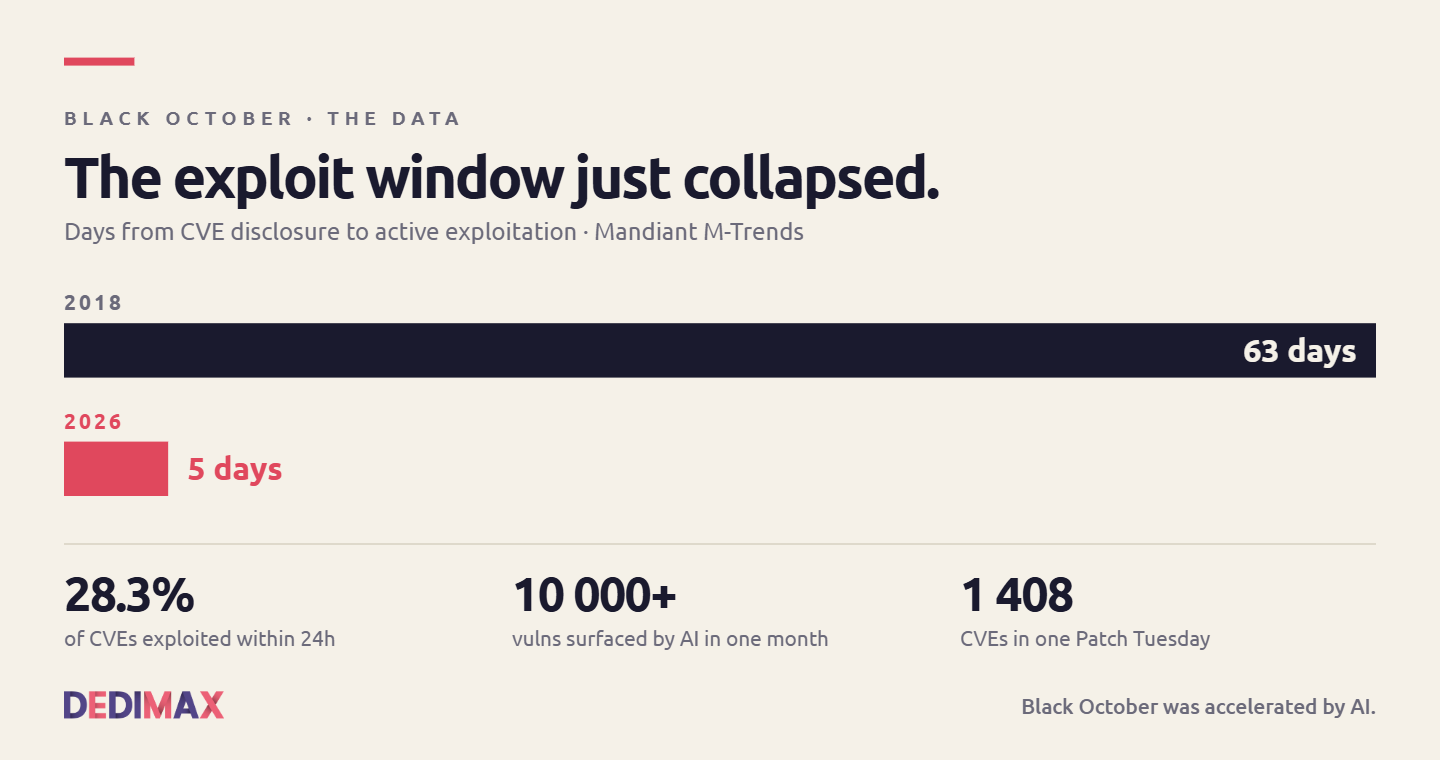
The last ten days have been nicknamed "Black October" in the security press. Two critical PHP RCE vulnerabilit...
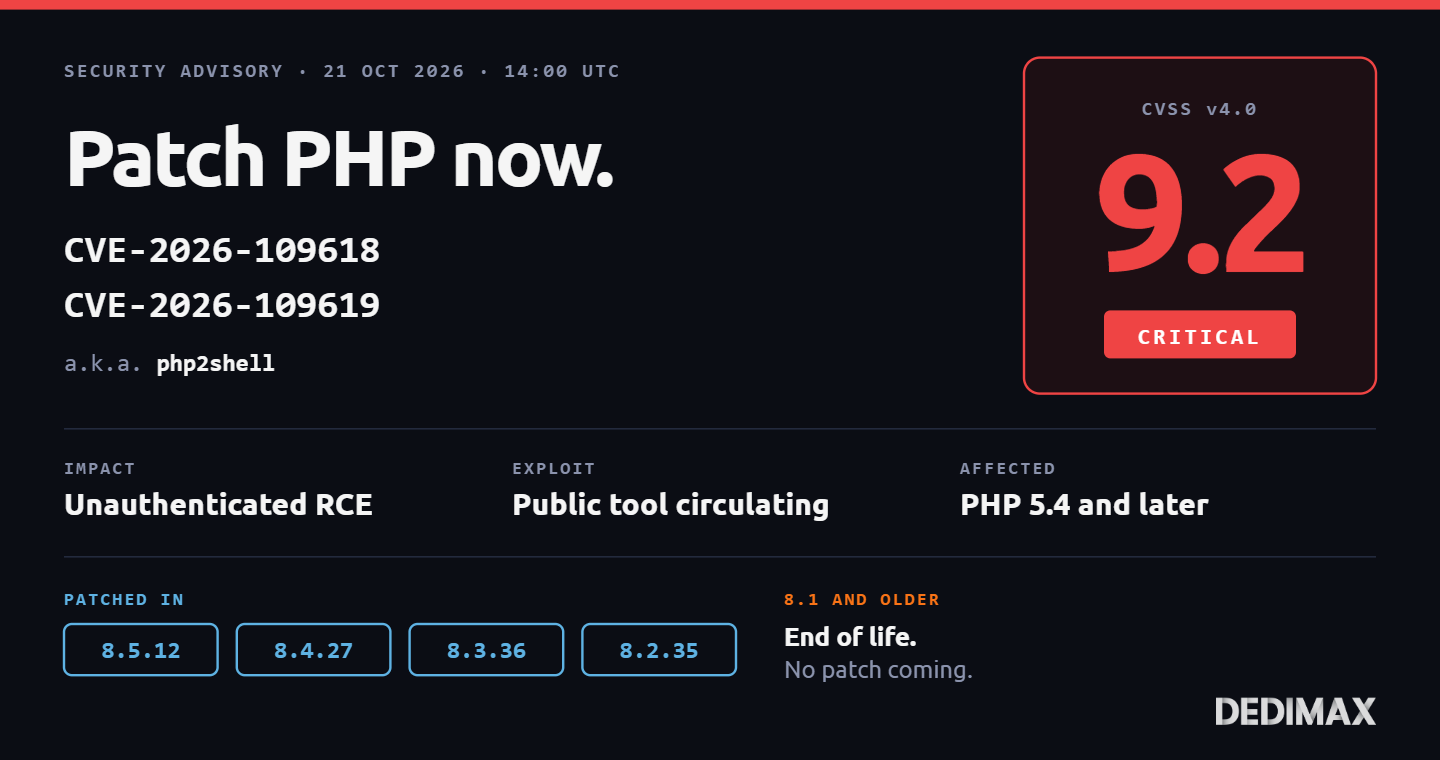
Two critical remote code execution vulnerabilities in PHP were patched today, October 21, 2026 at 14:00 UTC. T...
Take control of your dedicated server (settings, data ...) without any limits in apps usage.
What are you waiting for ?
We’re waiting for you on our blog. New guides and tutorials published regularly (sysadmin, gaming, devops...) !
Let me check